
Paint Tool
The Paint tool provides a free-form placement method for crowd elements in your scene. This intuitive brush-based system allows you to quickly populate areas with crowd members.
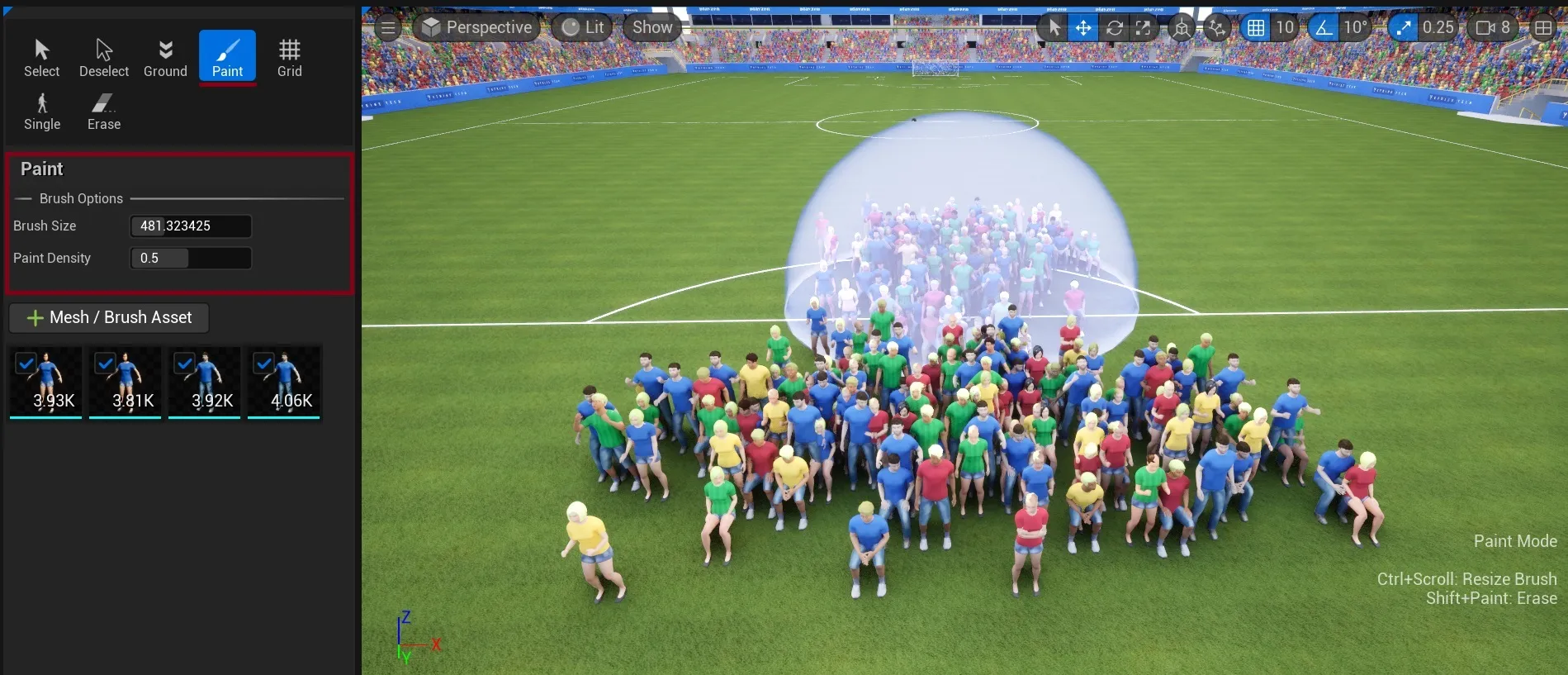
Brush Options
Section titled “Brush Options”The Paint tool provides two main controls in the Brush Options section:
Brush Size
Section titled “Brush Size”
- Numerical control for precise brush size adjustment
- Use
Ctrl + Scroll Wheelto quickly resize the brush- Larger sizes for broad coverage, smaller for precise placement
Paint Density
Section titled “Paint Density”
- Percentage control (0-100%) for instance density
- Works with brush’s “Density (per 1Kuu)” setting to determine final crowd density
For additional controls while painting, see Crowd Tools Keyboard Shortcuts.
Mesh/Brush Asset Selection
Section titled “Mesh/Brush Asset Selection”Below the brush options, you can select from your available crowd brushes. Each brush contains its own:
Brush Settings
Section titled “Brush Settings”Each brush defines how instances are placed and configured in your scene:
- Instance density and spacing
- Scale ranges and modes
- Surface alignment and height offset
- Rotation and orientation
For detailed configuration options, see Crowd Brushes
See Also
Section titled “See Also”- Getting Started - Understand how placement tools fit into the overall process
- Crowd Tools Editor Mode - Main editor interface
- Crowd Brushes - Configure brush properties for painting
- Grid Tool - Alternative grid-based placement
- Single Placement - Alternative precise placement
- Keyboard Shortcuts - Available shortcuts while painting