
Grid Tool
The Grid tool enables precise, structured placement of crowd elements in your scene using a configurable grid system.
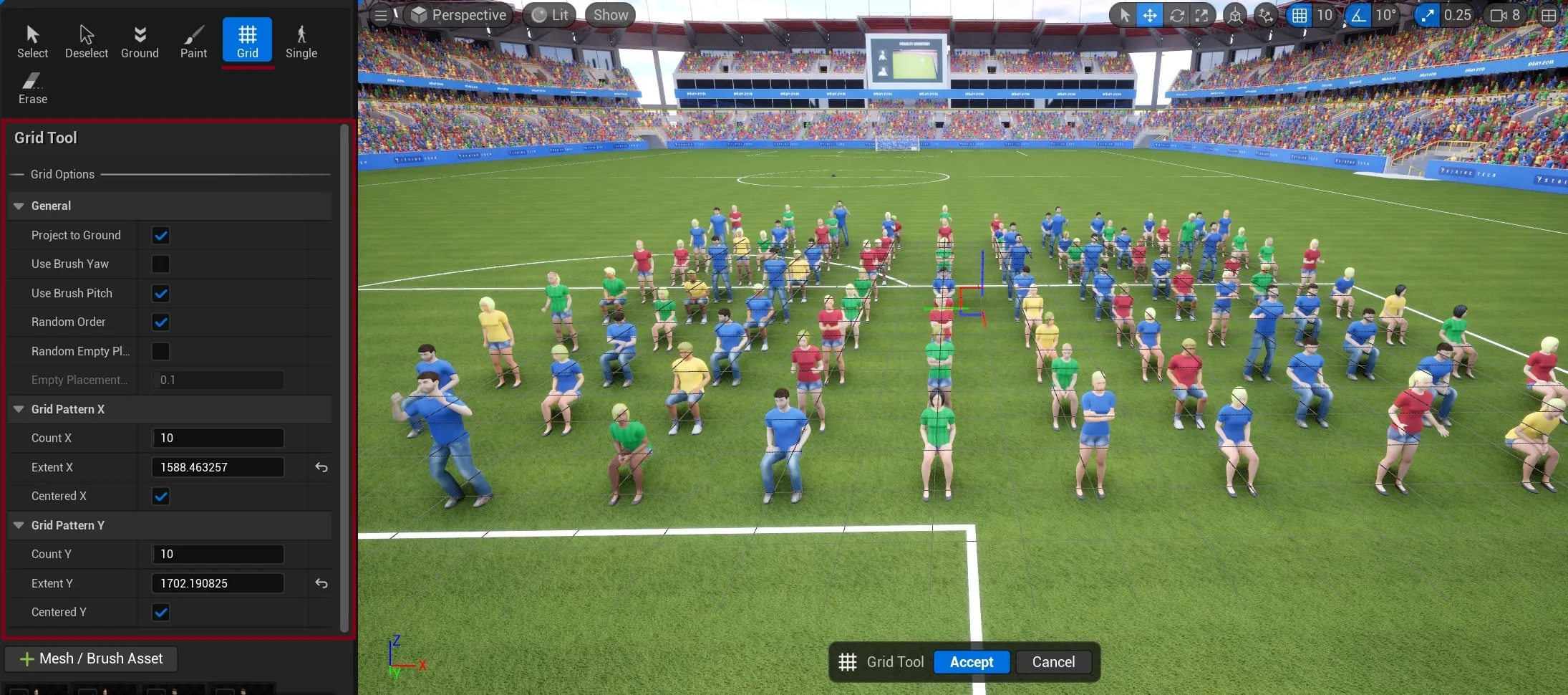
Grid Options
Section titled “Grid Options”General Settings
Section titled “General Settings”
- Project to Ground: Aligns instances to the surface beneath them
- Use Brush Hub: Applies brush settings to placed instances
- Random Order: Randomizes the placement sequence of instances
- Random Empty %: Sets the percentage of grid cells to leave empty
- Empty Placement: Fine-tunes the empty space distribution
Grid Pattern X
Section titled “Grid Pattern X”Controls the horizontal grid layout:
- Count X: Number of instances along the X-axis
- Extent X: Total width of the grid in units
- Centered X: Centers the grid horizontally around the placement point
Grid Pattern Y
Section titled “Grid Pattern Y”Controls the vertical grid layout:
- Count Y: Number of instances along the Y-axis
- Extent Y: Total depth of the grid in units
- Centered Y: Centers the grid vertically around the placement point
See Also
Section titled “See Also”- Getting Started - Understand how placement tools fit into the overall process
- Crowd Tools Editor Mode - Main editor interface
- Crowd Brushes - Configure brush properties for grid placement
- Paint Tool - Alternative free-form placement
- Single Placement - Alternative precise placement
- Keyboard Shortcuts - Available shortcuts while using tools